If you’ve been wary of AI in production — that it flattens craft, reduces the writer’s role, makes everything generic — the honest truth is the opposite.
In the beginning was the word — and in AI-rendered film, the word stays load-bearing all the way to the frame. Every collaborator the script will ever have downstream — cinematography, performance, design, score — first meets your story through your prose. The richer the prose, the more of those craft contributions the rendered film can carry. Your writing is the foundation everything else is built on; the clarity and specificity you bring to the page is what gives every other discipline something worth interpreting.
This guide is about getting your specific vocabulary, your particular images, your considered pace through the pipeline intact. It’s not about appeasing the machine — it’s about writing scripts that hold their voice when read literally.
The pipeline reads five distinct things from your script. The more of each you provide, the more of your direction survives:
- Action prose — the verbatim paragraphs between scene headings. The vendor reads these as cinematographic instruction. Specific verbs and tactile detail beat generic descriptors every time.
- Bracket tags —
[CAM:…],[LIGHT:…],[VFX:…],[TIME:…]. Direct-to-camera notes the parser pulls out as structured directives. - Character bibles in the script preamble — face, voice, wardrobe, identity anchors, “wrong looks”. Read once, applied to every shot the character appears in.
- Location bibles in the preamble — geography, atmosphere, palette, signature features, transitions. Locks the look of every scene set there.
- Dialogue + voice direction — the lines themselves plus voice profiles in the character bible. Determines acting beats and tonal delivery.
The dashboard pulls all five together at dispatch time and assembles a shot prompt that — if you’ve been thorough — reads like detailed director’s notes. If you’ve been thin, the AI fills gaps with defaults you didn’t pick.
Bracket tags are how you give specific directives without breaking the flow of action prose. The parser recognises them, extracts the contents, and surfaces them inline in the AI prompt — vendors that respond well to structured directives (Seedance especially) treat them as discrete instructions.
The full tag list
| Tag | Purpose | Example |
|---|---|---|
| [CAM] | Camera placement, lens, movement | [CAM: handheld, 35mm, low angle following Sarah, slight push-in] |
| [LIGHT] | Lighting design | [LIGHT: warm amber practical from streetlamp camera-right, deep shadow on faces, blue moonlight rim from window] |
| [TIME] | Specific time-of-day, weather, atmosphere | [TIME: 04:30 LOCAL, blue hour, thin mist rising] |
| [LOC] | Specific location detail not in scene heading | [LOC: Atacama salt flats, Antofagasta Region, view facing east] |
| [VFX] | Visual-effects directives, particle behaviour, locked elements | [VFX: ringed planet locked top-right of frame, gas giant lower-left, no parallax across shots] |
| [CGI] | Same lane as [VFX] — aliased | [CGI: alien skin matte black with bioluminescent veins, semi-transparent] |
| [ANIM] | Animation-specific motion | [ANIM: slow rise, deliberate breath cycle, no idle twitches] |
| [EDIT] | Edit-stage hints (duration, slow-motion, cuts) | [EDIT: 5s shot, last 2s slow-motion to 50%] |
| [PAL_NOTE] | 3D spatial layout notes (PAL viewport) | [PAL_NOTE: camera world-position (12, 5, -200), looking up-left 45 degrees] |
Where to put tags
Tags belong in the action lines of a scene, not in dialogue or scene headings. The parser scopes them per-scene — a tag in scene 4 applies to scene 4’s shots only, not scene 5’s.
In contextINT. ABANDONED FARMHOUSE - NIGHT

Sarah pulls back the curtain, frowning at the empty street. Her breath
fogs the cold glass.

[CAM: slow push from wide establishing to medium close on Sarah at the
window, low angle, 35mm feel]
[LIGHT: moonlight only, blue cast, deep shadow, warm sodium practical
from corridor doorway]
[VFX: lights flicker at 0:03 — single brownout, not a strobe]

                    SARAH
              (whispering)
        They’re not coming back.
One tag, multiple beats
If a scene has multiple shots and a tag should differ per shot, use the CUT TO: separator. Each CUT TO: starts a new shot; the tags before the next CUT TO: belong to that shot only.
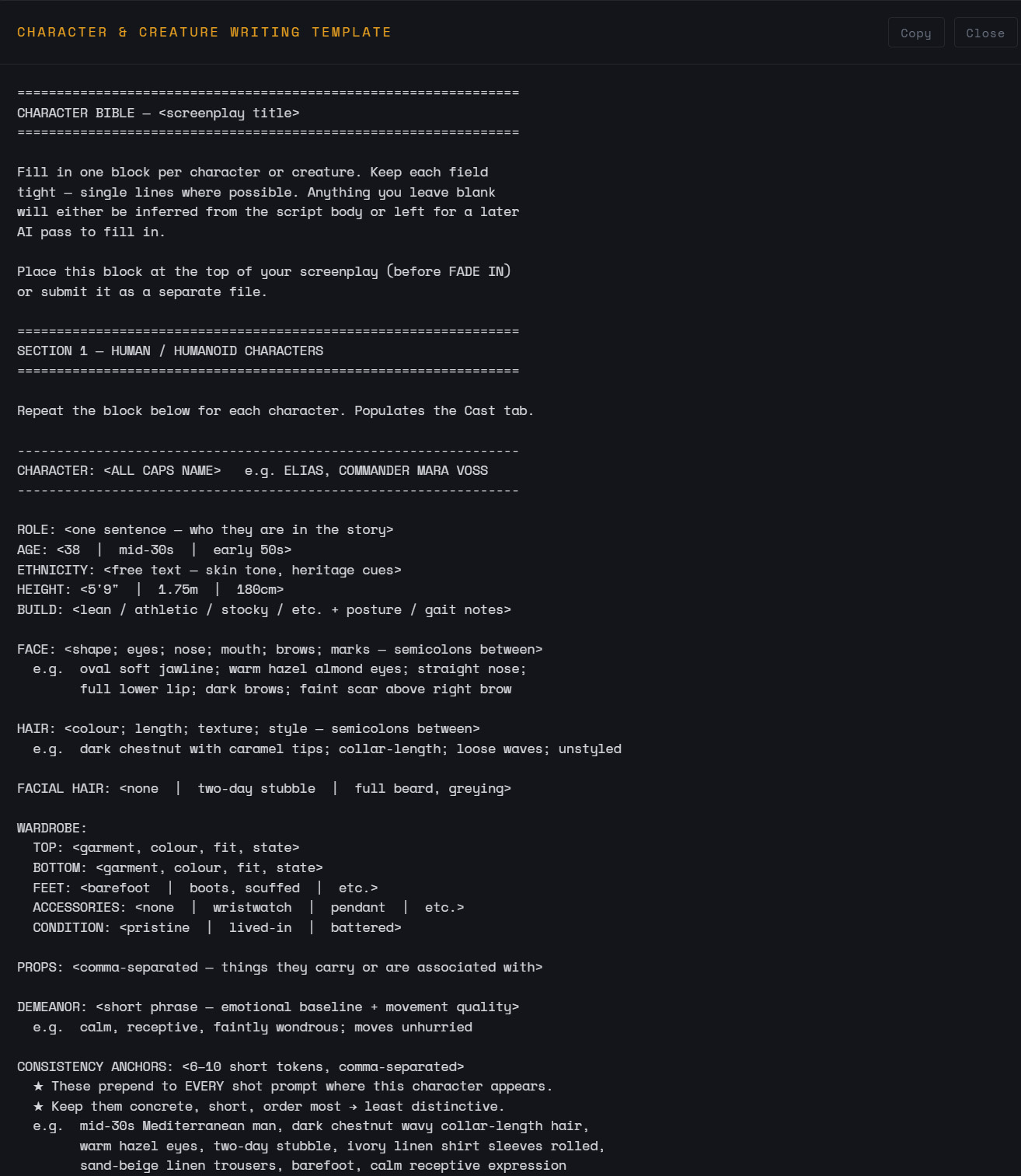
Each character is rendered hundreds of times across a project — one per shot they appear in, often more than that with regenerations. If their look drifts between shots, the film falls apart. The character bible is how you lock the look once.
Place the bible in your script preamble — above the first scene heading. The parser picks it up and seeds the Character entity. The dashboard then surfaces it for fine-tuning.
Preamble — character bible blockCHARACTER: SARAH HAWKES

  Age: late 30s
  Build: thin, drawn — looks like she hasn’t slept in three days
  Face: high cheekbones, small scar above left brow (childhood)
  Hair: chestnut bob, often pulled back
  Wardrobe: utilitarian — wool coat, work boots, never jewellery
  Demeanor: haunted, measured, watchful
  Voice: low alto with a slight rasp; speaks slowly with measured
         pauses; mid-Atlantic neutral; close-mic, no reverb
  Hard anchors: chestnut bob, small scar above left brow, wool coat
  Wrong looks: never glamorous, never primped, never girlish, never
               cheerful, never wearing makeup beyond minimal
The fields that matter most
- Hard anchors — the 2–4 things the AI must lock on every shot. Pick the most distinctive identity markers (a specific haircut, a scar, a wardrobe item that defines them).
- Wrong looks — what the character must never look like. Surfaces as negative directives. Useful when a character’s vibe is “not glamorous” or “not heroic”.
- Voice profile — tone, pace, accent, treatment. Drives both AI dialogue delivery (when audio is in scope) and prose direction in video prompts (“Sarah, voice low and breathy with that mid-Atlantic edge, whispers”).
A blank template ships with LCBE — paste it into your script preamble, then fill in. Open it inline:
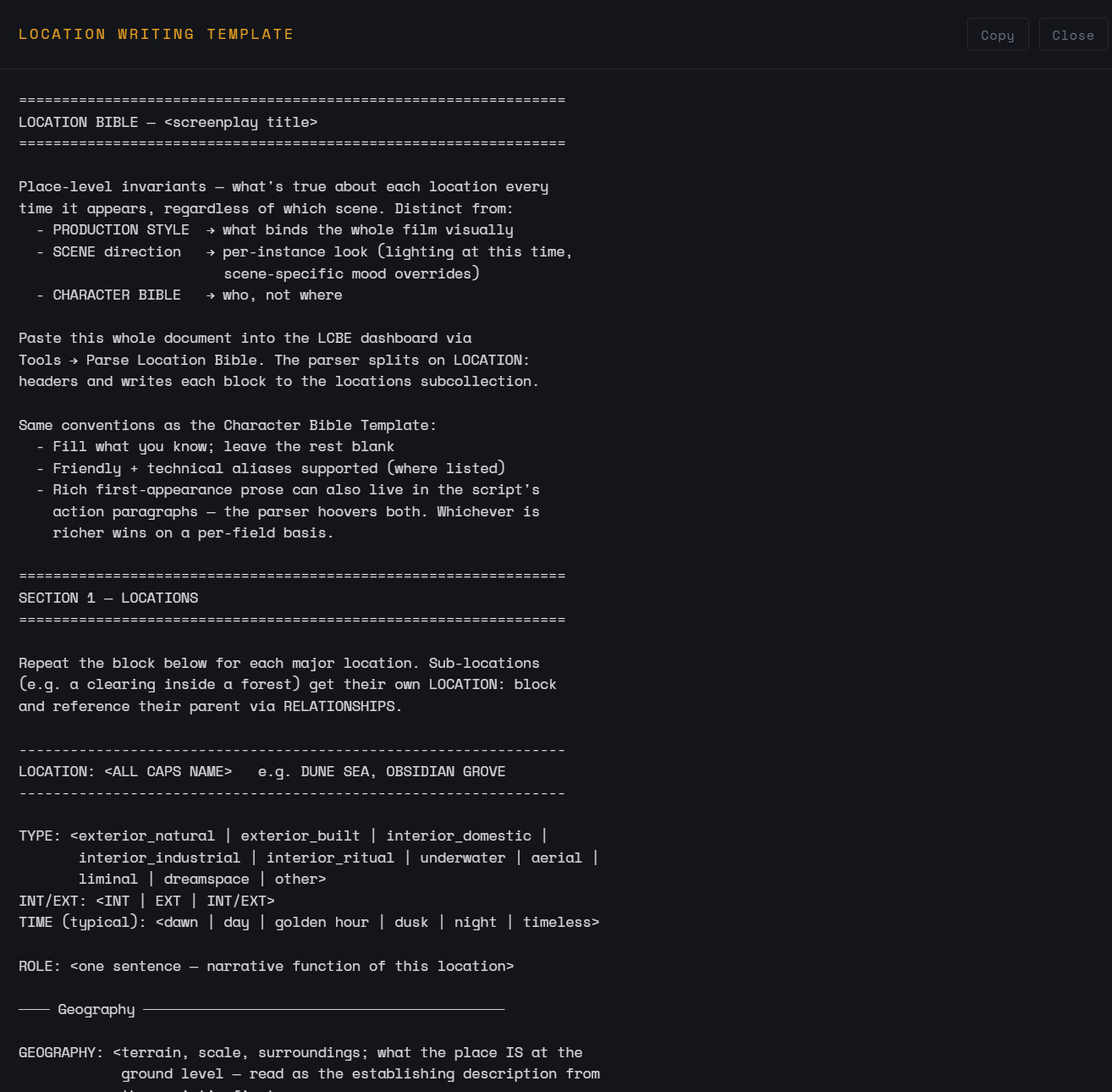
Same idea, for places. A location appears in every scene set there; if its atmosphere drifts, your film’s sense of place falls apart. The location bible locks geography, palette, signature features, and lighting character once.
Preamble — location bible blockLOCATION: ATACAMA SALT FLATS

  Geography: white salt crust over crystalline ground, polygonal cracks,
             distant volcanic peaks, no vegetation, vast horizon
  Architecture: none — natural, untouched
  Atmosphere: silent except distant wind; thin air; sense of vast scale;
              the feeling of standing on a planet, not a place
  Lighting character: knife-edge sun at midday with no clouds; harsh
                      shadow contrast; ground reflects bright back upward
  Color palette: desaturated white-on-white with ochre dunes in middle
                 distance, deep blue overhead, rust streaks at horizon
  Signature features: salt polygons, volcanic peaks, NO vegetation, NO
                      water, NO shade
  Tone: isolation, scale, time, indifference of land
  Avoid: green, water, shade, soft light, cinematic haze
  Transitions:
    - SALT FLAT APPROACH (boundary band of pale ochre conglomerate, ~1m drop)
    - VOLCANIC RIDGE (3km north, scoria-red against white)
The transitions field
If two of your locations physically connect (a corridor leading to a kitchen, a salt flat bordering a volcanic ridge), the transitions field locks the relationship. The pipeline reads it for cross-scene continuity — smooth palette shifts when characters move from one location to another, no jarring atmosphere jumps.
Open the location writing template inline:
Some directives don’t belong to a single scene. They span a whole sequence — a dream, a chase, an act, a montage. Examples: “the three planetary bodies stay locked in the same positions across every shot in this sequence,” or “the camera never crosses the 180 line for the duration of this confrontation.”
These are sequence-level continuity anchors. They live on a Sequence entity in the dashboard, not on any individual scene.
How to flag a sequence in the script
You don’t bind sequences in the script directly — you do it in the dashboard. But you can signal a sequence by writing a clear preamble paragraph wherever the sequence begins:
Preamble at sequence opening// SEQUENCE: DREAM (scenes 12-18)
//
// Continuity anchors for this sequence:
//   - Lock celestial-body orientation across every shot:
//     gas giant top-left, rust moon centre-low, ringed world far right
//   - Camera always slightly off-axis (never dead-on, never level)
//   - Audio bed: low sub-bass drone, no diegetic sound

INT. SARAH’S BEDROOM - NIGHT (DREAM)
…
The double-slash comment lines aren’t parsed by LCBE — they’re for the operator’s reference. After import, the operator opens the dashboard’s Production panel, creates a Sequence with those continuity anchors, then binds scenes 12–18 to it via each scene’s Sequence dropdown. From that point on, every shot in those scenes carries those anchors in its prompt.
Some elements must appear in every shot of the project — a binary star always overhead, a recurring graffiti tag, a cathedral spire visible from every street. These are persistent visuals, set on the project’s Production Style.
Persistent visuals are configured in the dashboard’s Production panel, not in the script. From the script side, the writer’s job is to flag them clearly so the operator knows what to set up:
Preamble — project-wide visual rules// PERSISTENT VISUALS (apply to every shot of the project):
//
//  1. Three planetary bodies always visible in the sky:
//     - "EYE" (gas giant, top-left of frame, 30% sky-fill)
//     - "RUST MOON" (centre-mid, 8% sky-fill)
//     - "RINGED" (far right, 5% sky-fill, rings tilted ~25 degrees)
//  2. The Spire — a needle-thin black structure visible on the horizon
//     in every exterior shot, regardless of viewing direction
Individual scenes can opt out via the Scene Container Panel’s “Suppress Persistent Visuals” toggle — useful for an interior where the planetary bodies wouldn’t physically be visible.
Dialogue runs through the same path as any screenplay — CHARACTER cue, optional parenthetical, the line. The pipeline parses these and attaches each line to the speaker’s voice profile.
Standard dialogue with voice direction baked inSARAH pulls back the curtain. Outside, an empty street.

                    SARAH
              (whispering, to herself
               more than to Tom)
        They’re not coming back.

Tom shifts in his chair, says nothing.

                    SARAH (CONT’D)
              (louder now)
        I said they’re not coming back.
What the pipeline does with this
- The screenplay format is parsed: Sarah is the speaker, the parenthetical is performance direction, the line is what she says.
- Sarah’s voice profile (from her character bible) attaches automatically: tone, pace, accent, treatment.
- The shot prompt to the video vendor weaves both: “Sarah, voice low and breathy with a mid-Atlantic edge, whispers to herself: ‘They’re not coming back.’”
If you don’t write parentheticals, the AI uses the script’s tonal context. If you do, they win — specific direction beats inference.
A short list of habits that produce poor AI output:
- Vague descriptors with no specific image. “Beautiful sunset” — the AI defaults to its idea of a beautiful sunset, which is generic. Write “The sun, the colour of clay, sliding behind a rust ridge, half its disc gone, scattering peach and indigo light into thin clouds.”
- Adjectives without nouns. “Epic, amazing, intense, gorgeous” — these don’t describe anything. Replace with the concrete thing that earns the adjective.
- Internal-state shorthand. “Sarah is sad” doesn’t render. “Sarah’s shoulders drop, hand fluttering to her mouth, eyes fixed on a single point on the floor” renders.
- Contradictions across scenes. If Sarah’s wardrobe is described as “wool coat” in scene 2 and “leather jacket” in scene 4 with no transition, the AI will follow your prose — and you’ll have continuity errors. Lock with hard anchors in the bible.
- Generic vocabulary when you mean something specific. “Big monster” produces a generic monster. “Quadrupedal, six metres at the shoulder, hide of segmented carapace plates the colour of wet rust, no visible eyes” produces your monster.
- Cluttered bracket tags. Three or four tags per scene is plenty; ten is noise. Tags are for things prose can’t naturally carry — lens, lighting design, FX directives. Don’t use a tag for what action prose already says.
Same scene, two ways. The vendor reads exactly what you write.
The vague version produces a generic crying-at-window stock image. The specific version produces something close to a director’s shot — sodium light, low angle, 35mm feel, a specific wardrobe item, a specific delivery. Same character beats. Wildly different output.
If it helps to have a way to think about it: imagine the AI vendor as a cinematographer who will execute exactly what you wrote — not what you meant. They’re extraordinarily fluent and capable, but they’ll never ask “what does this look like in your head?” They’ll just render their best read of the page.
The richer your craft on the page, the more of your particular vision survives. The thinner the prose, the more the AI gets to fill in. There’s no in-between — no rehearsal, no notes session, no “take two with more grit.” What you wrote is what gets made.
If you’ve read this far, you have the toolkit. Use the bibles. Use the tags. Be specific. The film will reflect it.